
The guide will help you install mods to your Hytale server!
Step 1: Find Mods
-
For now, a few sources for Hytale mods are CurseForge.
-
Browse available mods here: CurseForge – Hytale Mods.
Step 2: Download the Mod
-
When you download a mod, it will typically come as a .jar file.
-
Keep this file handy — you’ll need it for installation.
Step 3: Upload the Mod to Your Server
-
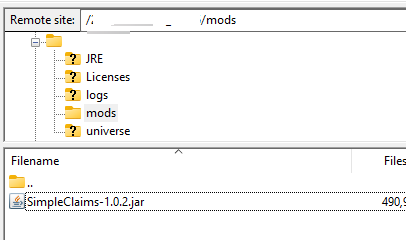
Place the .jar file into your server’s mods folder.
-
You can do this in two ways:
-
FTP client (e.g., FileZilla)
(Click here for the guide) -
Control Panel File Manager
-
Here is an example of a mod that has been installed on the server using FTP:
Step 4: Restart the server
-
With each new installed/uploaded mod, you will need to restart the server to apply it.
Otherwise, STOP the server before making any changes or uploading to your server.
Order your Hytale server today: Click Here!
